Question: How do I set my notification preferences?
There are two different groups of notification preferences.
The first group of notifications is related to invoicing and payments.
The second group of notifications is related to the emails and texts you receive from the Campmeeting.
Invoicing and Payment Notifications
- Log into your owner portal and, if necessary, select one of the units.
- Scroll down to the bottom of the page to the Owners block. You will see a button on the right for Notifications preferences.

- After you click on “Notifications preferences” you will be able to control what type of notifications you want enabled or disabled.

- Click Save Changes after making changes.
Emails & Texts from Campmeeting
- The Campmeeting groups its communications into Alerts and Announcements.
- Alerts typically include road closures, snow announcements, water alerts, etc.
- Announcements typically include meeting reminders, newsletter publishing, weekly events, etc.
- A Member can see these notification preferences by logging into their owner portal and, if necessary, selecting one of their property units.
- Within the main "Unit Information" block, you can see your current selections for these types of communications.
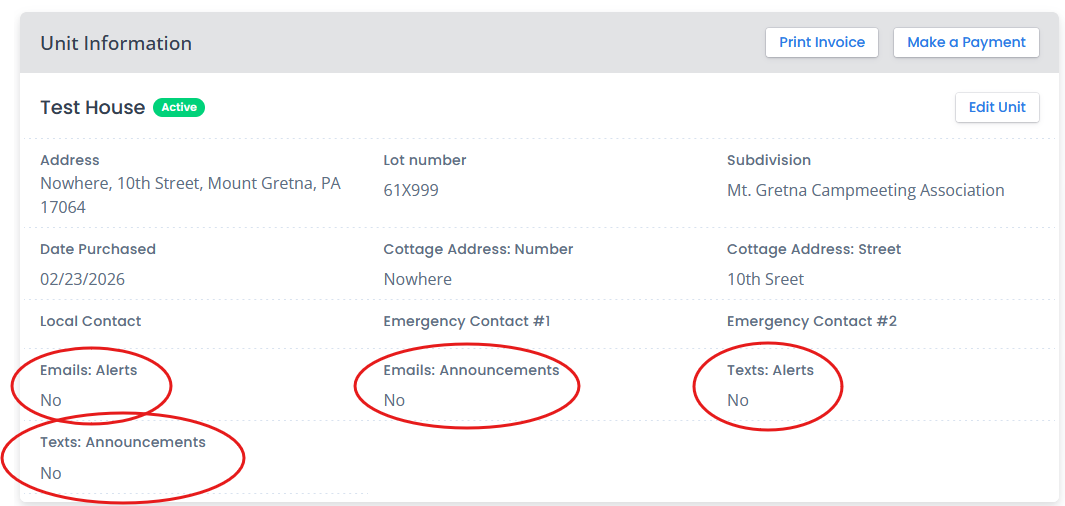
- These fields cannot be changed by the owner. Please contact the office to have these preferences changed.